
Now Part of Process Lasso
Tune how Windows shares CPU time between apps. TweakScheduler adjusts the Win32PrioritySeparation registry value, which controls whether the foreground app (the one with focus) gets longer CPU time slices than background processes, and if so, by how much.
In Process Lasso, choose Windows Scheduler Settings from the Tools menu (in older versions, Options > Tools).
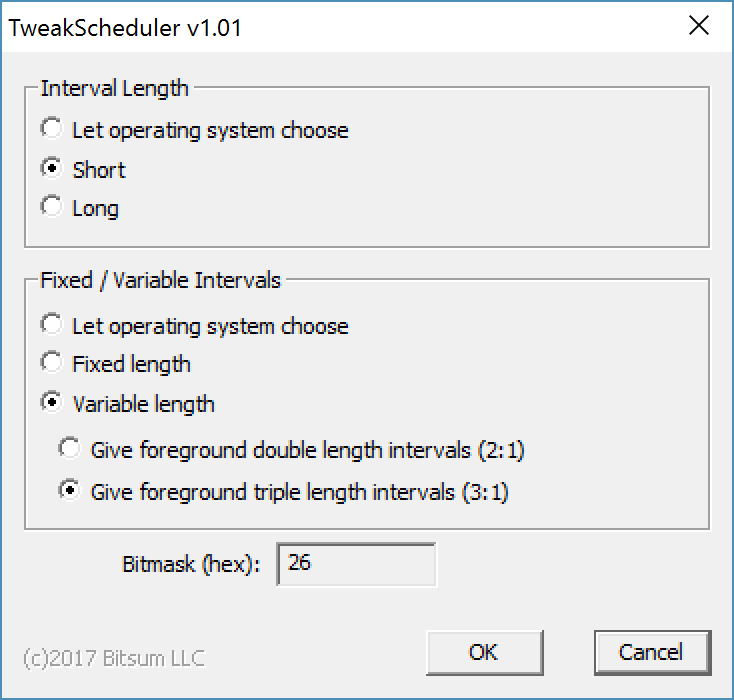
The Settings
Each choice sets part of Win32PrioritySeparation, and TweakScheduler shows the resulting bitmask.
Short or long CPU time slices, or let Windows choose.
With fixed intervals, every process gets slices of the same length. Variable intervals let the foreground app get longer ones.
With variable intervals, how much longer the foreground app’s slices are: double (2:1), triple (3:1) or no boost (1:1).
Defaults
With the defaults (“Let the operating system choose”), Windows Server gives foreground and background processes equal time slices, while other editions of Windows give the foreground app longer ones. TweakScheduler shows what Windows chooses on your PC.
For details on the registry value, see Microsoft’s Win32PrioritySeparation documentation (PDF).
Bitsum Technologies
Independent Windows software since 2002. We build novel solutions to software performance and automation challenges.