
Free Hybrid CPU Utility
A free Windows app that keeps the processes you choose from being scheduled to the efficient cores (E-cores), so they stay on the performance cores (P-cores). For demanding applications such as gaming, audio production, video editing and streaming.
Version 1.2.2.4, January 9, 2024. 64-bit Windows installer; see installer details for silent installs.
Why It’s Necessary
A common challenge with hybrid CPUs, such as Intel 12th generation and later, is the occasional undesirable scheduling of threads onto the efficient (E) cores, hampering their performance.
This happens because most applications have not been, and may never be, updated to tell the scheduler what kind of load their threads carry, leaving Windows to rely on educated guesses.
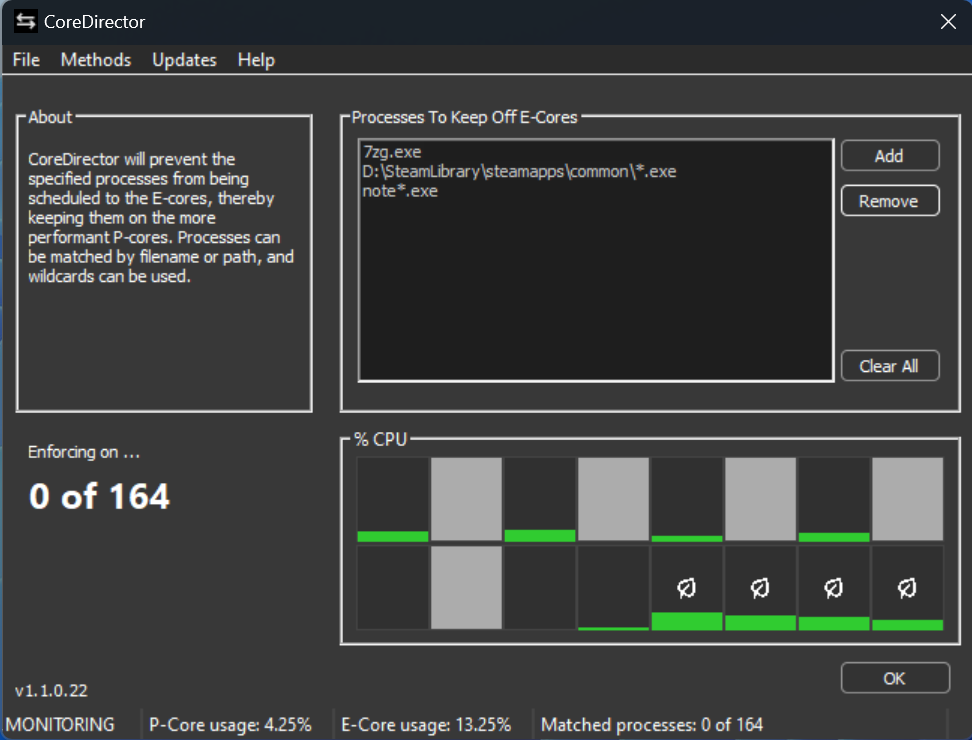
Until applications specify where their threads belong, CoreDirector keeps the processes you list off the E-cores. Match processes by filename or by full path, and use wildcards, for example note*.exe or D:\SteamLibrary\steamapps\common\*.exe.
How It Works
CoreDirector can enforce gently, by turning off Efficiency Mode for target processes, a little more firmly with CPU sets, or strictly with CPU affinities. Choose the method or methods in the Methods menu.
Prevents the process’s threads from being put into Efficiency Mode, so they aren’t automatically scheduled to the E-cores. A process can still use the E-cores if its thread count warrants it, or if it specifically chooses to.
Somewhere in between the other two methods, leaving much of the decision to the operating system.
Restricts all threads to the P-cores. The only exception is a process that intentionally schedules itself onto the E-cores; for that, use Process Lasso with Forced Mode to override the process’s own choices.
Features
List processes by filename or full path, with wildcards. CoreDirector checks running processes every second.
A per-core CPU usage graph marks the E-cores, and the status bar shows P-core usage, E-core usage and how many processes matched.
Starts with Windows and works from the tray; open the window only when you want to change the list.
Follows your Windows app mode, light or dark.
Checks for new versions daily, or on demand from the Updates menu, with an option to include betas.
CoreDirector runs fine alongside Process Lasso.
Need More Control?
We made this simplified tool freely available to the community. For this purpose we recommend our more powerful Process Lasso software.
Keep processes off the E-cores with more options, including Forced Mode for processes that schedule themselves onto the E-cores.
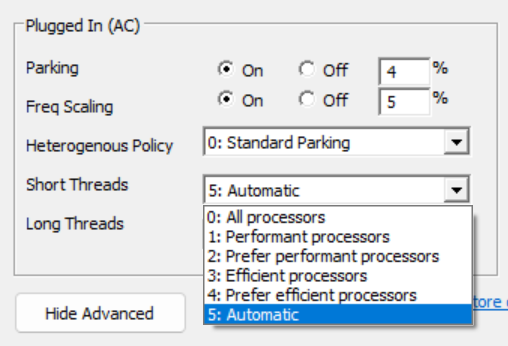
Our ParkControl software offers the power plan heterogeneous scheduling settings.
For Administrators
Changelog
Bitsum Technologies
Independent Windows software since 2002. We build novel solutions to software performance and automation challenges.