
Free and Open Source
A free, open source CPU optimization utility for the AMD Threadripper 2990WX and 2970WX on Windows. It offers two features: Our implementation of AMD’s Dynamic Local Mode, and our NUMA Dissociater.
Dynamic Local ModeNUMA DissociaterCorePrio UsageRevision History
Two Features
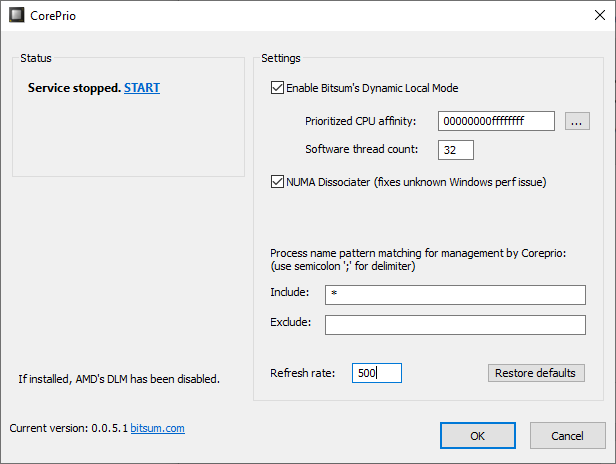
More configurable and robust than AMD’s implementation: Set the prioritized CPU affinity, the (software) thread count, the refresh rate, and which processes to include or exclude. Conceived for the Threadripper 2990WX and 2970WX and their asymmetric die performance; there are potentially other use cases.
How Dynamic Local Mode worksAn experimental feature, confirmed to work on the EPYC 7551 and Threadripper 2970WX and 2990WX. It may work on other HCC NUMA platforms.
About the NUMA DissociaterDynamic Local Mode
When the Threadripper 2990WX and 2970WX were developed, AMD had to make do with the 4 memory channels available on TR4 socket motherboards, to retain chipset compatibility. So 2 of the 4 dies in these CPUs have no memory channels attached. They must pass all memory requests through the Infinity Fabric chip interconnect.
Because of this indirect I/O access, the memory (and PCIe) latency of two dies, half the system’s cores, ends up higher than that of the other two.
By default, each die is exposed as a NUMA node. The two more optimal dies each have 2 memory channels of node local memory; the two less optimal dies have none. NUMA designs are more typically used to associate the memory closest to a CPU package, so the operating system knows which memory to use for threads running on specific CPUs.
The lack of node local memory throws Windows for a loop. It doesn’t realize it should schedule threads on the more optimal dies first, since it focuses on matching memory to CPUs. With no memory to match to the less efficient dies, it simply schedules threads equally across the entire CPU package.
Pending scheduler work from Microsoft that may never come, AMD developed a workaround called Dynamic Local Mode. It monitors running threads and suggests to the OS that those with the highest activity be scheduled on the more efficient dies. AMD’s Dynamic Local Mode is included with their Ryzen Master software.
We developed our own implementation of Dynamic Local Mode, which allows tuning and customization beyond what AMD’s offering can do.
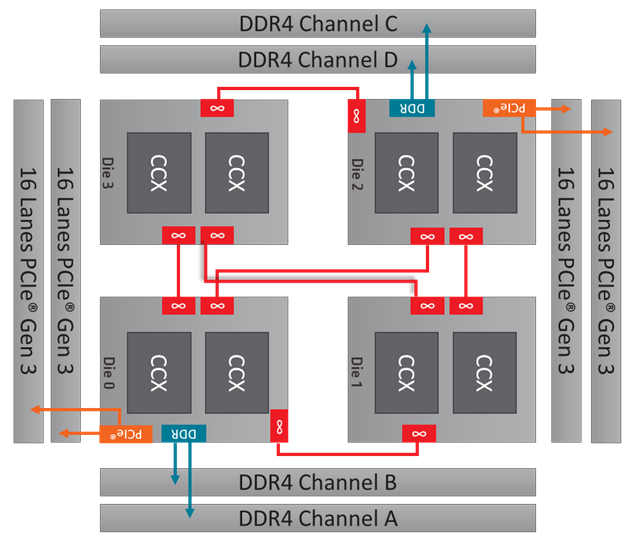
CorePrio monitors all threads on the system and moves those with the highest activity to the more optimal CPU dies, while still letting Windows choose exactly where on those dies to schedule them. When a thread’s activity diminishes, its affinity is changed back to all dies.
Since no hard CPU affinity is set, applications are still free to expand across the entire CPU. That’s why we call it a prioritized soft CPU affinity.
Dynamic Local Mode is designed for loads that don’t max out all available CPU cores. Applications that put a full load across the entire CPU could perform marginally worse, because when the whole CPU is loaded there are no cores to prioritize threads to. It may be best to exclude some highly multi-threaded applications.
You can see details of CorePrio’s thread management with the console utility, or with an elevated instance of DebugView with Capture Global Win32 enabled.
NUMA Dissociater
This is a curious discovery, and a feature still under investigation.
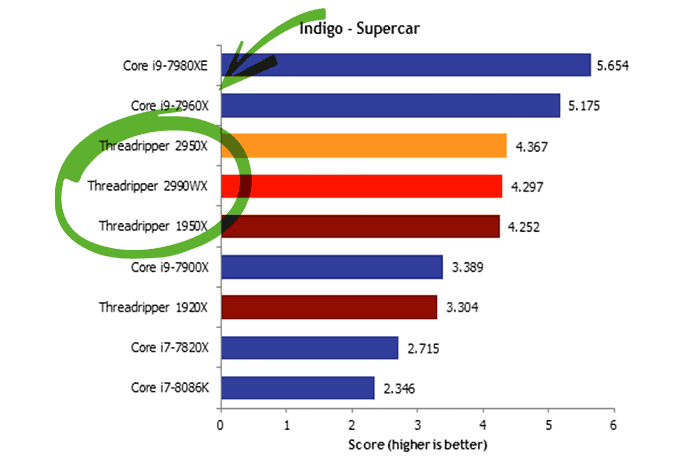
Wendell at Level1Techs bought an EPYC 7551 and found the same sub-optimal benchmark results seen on the 2990WX. When the EPYC system was set to UMA mode, the performance issues disappeared, and certain benchmarks, specifically Indigo and 7-Zip, saw 2X gains, bringing them up to par with their theoretical performance based on core count and with the performance seen on Linux.
This led Wendell to believe the issues on the 2990WX were not solely due to 2 dies having no direct memory channels, and that the same effect was being seen on both platforms.
Back in NUMA mode, he noticed that changing the CPU affinity of select benchmarks (such as Indigo) made them mysteriously faster. That explains the gains he saw earlier after removing core 0 in 2990WX Indigo benchmarks. Ian at AnandTech later tested core 0 removal on the 2990WX and didn’t see the same impact: The CPU affinity has to be changed after the process starts. The effect isn’t seen when the affinity is assigned during process creation.
Dumping thread information in real time showed that after the fix is applied, thread ideal processors are doled out differently, no longer constrained to a single NUMA node. That alone shouldn’t cause a problem, since ideal processors are supposed to be only a hint to the scheduler.
Nobody knows, or at least nobody has said. It could be core thrashing, or a memory channel bottleneck inherent to the NUMA allocation strategy. No theory has panned out to a definitive cause, which leads to speculation that it may be a bug or quirk deep in the Windows scheduler.
The fix is bizarrely imprecise. For affected processes, a call to SetProcessAffinityMask, without even changing the affinity (all CPUs to all CPUs), resolves the performance issue, at least most of the time. Our best guess is that it removes the process’s preferred NUMA node, which changes the Windows scheduler’s behavior, as shown by the thread ideal processor selections and, more importantly, the massive change in performance. The NUMA Dissociater applies this, with ~100% gains in Indigo and select other benchmarks.
The Threadripper 2990WX and 2970WX and the EPYC 7551 are confirmed. It isn’t clear whether this applies only to AMD processors. Hopefully the community can contribute to our understanding of the details and scope of this behavior.
The NUMA Dissociater doesn’t always take, particularly on the 2990WX; EPYC is less affected. On the 2990WX, if the Indigo process is restarted 10 times, about half of those runs won’t be the fast one. That’s still a massive improvement, since without the NUMA Dissociater every run is slow. This isn’t a bug in CorePrio but something inherent to the performance issue, and as we learn more we expect to improve consistency.
Usage
CorePrio can run as a system service with a managing user interface, or as a stand-alone console mode utility.
The CorePrio installation package contains:
corepriow.exeThe GUI, resident in the system tray.cpriosvc.exeThe CorePrio service.coreprio.exeThe CorePrio console mode utility.Launch the GUI from the Start menu or by running corepriow.exe. It lets you start and stop the service and tweak its parameters, and it resides in the system tray as a CPU icon.
The prioritized affinity defaults to the first half of the logical cores, and the number of threads to prioritize defaults to half the total logical core count (or the number of logical CPUs in the prioritized affinity).
Threads to prioritize (formerly thread count) is the maximum number of software threads moved to the prioritized CPU set at any given time. It should generally not exceed the number of CPU cores in the prioritized CPU affinity mask.
Limited debug output from the service can be viewed with an elevated instance of DebugView with Capture / Capture Global Win32 checked. To see output, the console mode utility is recommended.
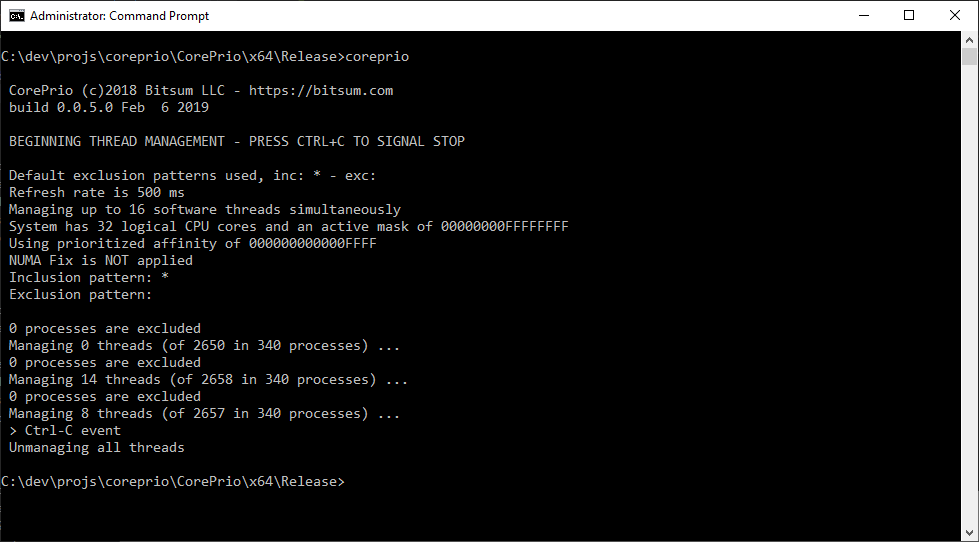
Run coreprio.exe without parameters to use the defaults or saved settings; command line parameters override them. Running the console utility stops the CorePrio service, and the same algorithm runs in the console instead, so the output you see is from the console app, not the service.
USAGE: CorePrio [-i refresh_rate_ms] [-n sw_thread_count] [-f] [-a prioritized_affinity]
                [-l,--inclusions include_pattern] [-x,--exclusions exclude_pattern]
Defaults:
            -i (rate) -> 500 (ms)
            -n (threads) -> half of logical core count
            -a (affinity) -> first half of logical cores
            -l,--inclusions -> '*'
            -x,--exclusions -> ''
Inclusion and exclusion patterns are semicolon ';' delimited. Inclusions processed first, then exclusions.
The -f parameter enforces an experimental performance fix for Windows NUMA and disables DLM.
Example:
CorePrio -i 500 -n 32 -a 00000000ffffffff --inclusions * --exclusions someapp.exe;more*.exe
Runs CorePrio at a refresh rate of 500 ms, managing 32 threads, with a prioritized CPU affinity of 0-31. It includes all processes (*) and excludes those matching someapp.exe or more*.exe.
CorePrio is freeware. You can support it, and the continued R&D of other Bitsum projects, by buying a license for Process Lasso Pro, or by donating any amount.
Subscribe to get the latest posts sent to your email.
Bitsum Technologies
Independent Windows software since 2002. We build novel solutions to software performance and automation challenges.